A customer asked us to automate a familiar incident-response task: take a destination from a Cisco XDR finding and block it on the affected Meraki network. The security team wanted a faster response during active investigations, while the network team needed assurance that automation would not disturb the rest of the production policy.
The proposed action sounded narrow. Add one deny rule for one source and destination pair. During our first design review, however, we confirmed that the Meraki endpoint did not accept a single new rule as a patch. It accepted the complete Layer 3 firewall policy. A workflow built only from the finding could submit a valid request and replace every rule not included in its payload.
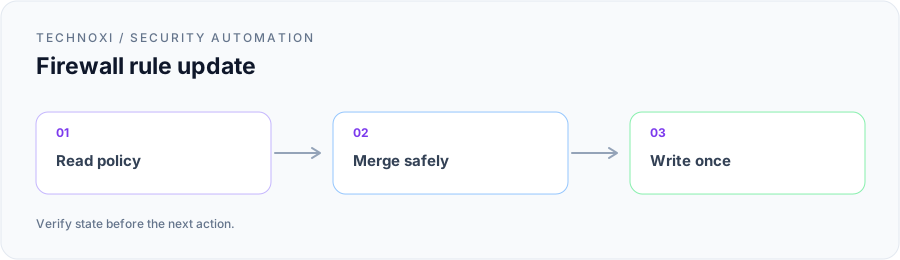
That discovery changed the project. We were no longer implementing an “add rule” call. Together with the customer’s security and network teams, we designed a controlled read-merge-write operation: resolve the right network, retrieve its current policy, validate and merge one proposed rule, write the entire policy once, and then retrieve it again to verify the result.
Defining what a safe block required
Before building the write path, we agreed on the evidence the workflow needed. A finding had to identify an affected network and provide an internal source and external destination that could be normalized into values accepted by the firewall. The requested direction mattered. Reversing the pair could block the wrong traffic even though the provider accepted the request.
Network resolution also needed to be explicit. Some findings referenced assets associated with more than one location, and the same destination could appear in several policies. We would not select the first network returned by a lookup. An unambiguous mapping could continue automatically; multiple or missing candidates created a hold with the candidates shown to an operator.
The customer also required existing rule order to remain stable. Rule order can carry policy meaning, and an automated response was not the place to reorganize a carefully maintained ruleset. The merge would preserve every existing entry in sequence and insert only the approved deny in the agreed position. It would not clean up descriptions, combine ranges, or remove apparent duplicates as a side effect.
Finally, we established precise outcomes. new-rule meant a validated candidate was eligible for a write. already-present meant the effective policy already denied the exact normalized pair. duplicate meant the finding produced a candidate already handled in the same run. invalid meant the addresses or direction could not be safely interpreted. capacity meant the complete policy could not accept another entry within the provider constraints. Only a write followed by a successful read-back could be described as blocked.
We used a compact decision object throughout the workflow and in sanitized review material:
{
  "network": "<network>",
  "source": "<internal-source>",
  "destination": "<external-destination>",
  "decision": "new-rule | already-present | duplicate | invalid | capacity",
  "write": false
}
The boolean started as false and did not change merely because the candidate passed validation. It represented whether the workflow had actually submitted a policy update. The provider result and verification result were recorded separately so that a successful request could not conceal an unsuccessful outcome.
Building from the live policy
The first implementation step was always a fresh GET against the selected network. We deliberately did not use a policy cached during enrichment or copied into the incident when the detection fired. Network operators could make a legitimate change while an investigation was underway, and the automation had to treat the provider as the source of truth at the moment of action.
We parsed the finding into a normalized candidate only after the network was resolved. The normalization retained the distinction between source and destination, canonicalized supported address forms, and rejected missing or malformed values. It did not “repair” uncertain data by swapping fields or broadening a host address into a range. If the evidence was incomplete, the workflow stopped with the original and normalized values available for review.
The merge compared the normalized (source, destination) pair with the live rules. An exact existing deny produced already-present, no PUT, and a work note identifying the covering rule. Repeated candidates within a batch produced duplicate. A genuinely new pair became a proposed deny while all existing entries, including fields the workflow did not need to interpret, were carried forward unchanged.
That last detail was important. Reconstructing known fields into a simplified schema would have risked discarding provider attributes added later or maintained outside the automation. The customer’s network team reviewed the serialization logic with us using sanitized policies. We compared the outgoing representation with the incoming document and confirmed that unrelated rules and attributes survived the round trip.
Before a write, the workflow validated the complete merged document rather than the new entry alone. It checked the provider’s applicable rule and destination limits and confirmed that the candidate had not expanded unexpectedly during normalization. If adding the deny exceeded a limit, the workflow returned capacity and sent nothing. It listed the unplaced candidate and assigned the decision to the network owner; it did not remove an existing rule or choose one threat over another.
Handling concurrent changes
A read-merge-write sequence creates a race: another operator or process can change the policy after the initial GET. We discussed this directly with the customer because preserving the first snapshot was not enough if it had already become stale by the time of the PUT.
The workflow therefore performed a pre-write consistency check using the provider state available to the integration. Immediately before mutation, it retrieved the policy again and compared it with the baseline used for the merge. If they differed, the prepared payload was discarded. The workflow could rebuild from the newer policy only within the bounded execution path; otherwise it held the action for reconciliation. It never wrote the old snapshot over the newer one.
We also serialized writes for the same network in the orchestration layer. Findings for different networks could proceed independently, but two candidates targeting one policy could not both read the same baseline and race to replace each other. When a queued action reached the write stage, it still repeated the live checks. Serialization reduced the opportunity for collision; it did not replace verification.
These controls made the implementation less visually impressive than firing parallel PUT requests, but they matched the operational reality. The object being changed was a shared policy document, not an isolated indicator record.
Treating uncertain responses as reconciliation work
The most useful failure scenario was a timeout after submission. The network accepted the updated policy, but the caller did not receive the response. From the workflow’s perspective, the result was unknown: retrying the same complete payload could overwrite a newer policy, while reporting failure could encourage an analyst to press the action again.
We made reconciliation the next step. After an ambiguous response, the workflow performed a fresh GET and looked for the exact normalized deny while also checking the surrounding policy. If the expected merged document was present, the action could be verified without another write. If the deny was absent and the policy still matched the safe baseline, the case could return to the controlled decision path. If the state differed in any other way, it stopped for review.
The same normalized pair served as the idempotency key on a later run. If the first request had succeeded, the next read returned already-present. If the first request had failed before reaching the provider, the candidate could be evaluated against the current policy rather than replayed blindly. We did not use a previous HTTP result as proof of current firewall state.
Provider errors remained provider errors. Authentication failure, authorization failure, validation rejection, rate limiting, and transport ambiguity were recorded distinctly because they required different operator responses. The workflow did not convert all exceptions into “block failed,” and it never produced a success note from a request that had not passed read-back verification.
Testing the paths that could damage policy
We tested the workflow with the customer’s security and network teams before enabling production writes. The first case used an existing deny. The expected result was no policy change, an already-present decision, and enough rule context for the analyst to understand why no action was necessary.
For the new-rule case, we captured a sanitized before state, inserted one candidate, and compared every preserved entry with the read-back policy. We checked order, values, and provider-retained attributes, not just the presence of the new destination. That test demonstrated the customer’s primary requirement: the response could add the intended control without silently changing unrelated controls.
We then exercised negative paths:
- a source and destination presented in reverse order;
- a missing or malformed destination;
- an ambiguous network mapping;
- two findings for the same normalized pair;
- a policy at or near its rule limit;
- a policy changed by an operator between reads;
- an accepted request followed by a simulated client timeout;
- a provider rejection and a delayed response; and
- a second run after a verified successful update.
Each scenario had an expected decision before execution. Invalid input stopped before policy retrieval or mutation as appropriate. Capacity returned the unplaced candidate without removing anything. A concurrent change invalidated the prepared payload. A timeout entered reconciliation rather than immediate retry. A second run found the existing deny and performed no write.
We also tested verification failure independently. A successful PUT response was followed by a read-back that did not contain the expected state. The workflow marked the action unresolved and stopped. It did not issue another PUT, because the mismatch could indicate propagation delay, provider-side transformation, the wrong network, or a concurrent change. Those possibilities required evidence, not repetition.
Making the handoff useful to both teams
The customer did not want a firewall change to disappear into an automation log. We shaped the work note with the people who would inherit the incident on the next shift. It carried the finding reference, selected network, normalized direction and pair, decision, write status, provider response category, and verification result. Skip and hold paths included an owner and the evidence needed for the next decision.
That record kept several outcomes from collapsing into the same green status. “Already present” documented that no mutation was needed. “Capacity” documented that the workflow intentionally preserved the current policy. “Submitted, verification unresolved” identified a reconciliation task. “Verified” meant the exact deny was present after the update and the rest of the intended policy matched.
For customer review, we used synthetic values and the diagram rather than a live management-console capture. A useful before-and-after image would need to show the added deny and preserved rules while removing network names, public addresses, organization labels, and management URLs. Where that sanitization could not be guaranteed, the diagram communicated the engineering decision without exposing the environment.
The delivered response
The delivered workflow gave the security team a direct response path from a validated XDR finding and gave the network team control over how a shared production policy changed. It resolved the target, read the current rules, merged one normalized decision, validated provider limits, guarded against concurrent changes, wrote once, and verified from a fresh read.
Just as importantly, it made no-change and unresolved outcomes first-class results. Duplicate findings did not produce duplicate rules. An existing deny did not generate another write. Invalid or ambiguous input did not get “best effort” interpretation. Capacity and concurrency did not trigger cleanup decisions the customer had never authorized. Unknown provider outcomes went to reconciliation.
The project began as a request to block an address quickly. The work we completed together was broader and safer: a response that could explain which network it selected, what it intended to change, what it preserved, why it sometimes stopped, and what the firewall actually contained afterward. The API call remained one step. The engineering value was making that step predictable in a policy other teams were also responsible for protecting.