NEWS

Cisco MINT Partner! Learn more →

Automation & AI
2026-09-15
23 min read

Search-and-Delete Buys You a Clean Mailbox and a Dirty Audit Trail

Broad remediation feels decisive and cleans the inbox. Then someone asks which messages you acted on, and the answer is 'we ran a search'. Targeted message-ID remediation answers that question per mailbox, per message.

Email Security
SOAR
Phishing Remediation
Microsoft Graph
Incident Response
Security Automation

Remediation you can't account for is just a cleanup

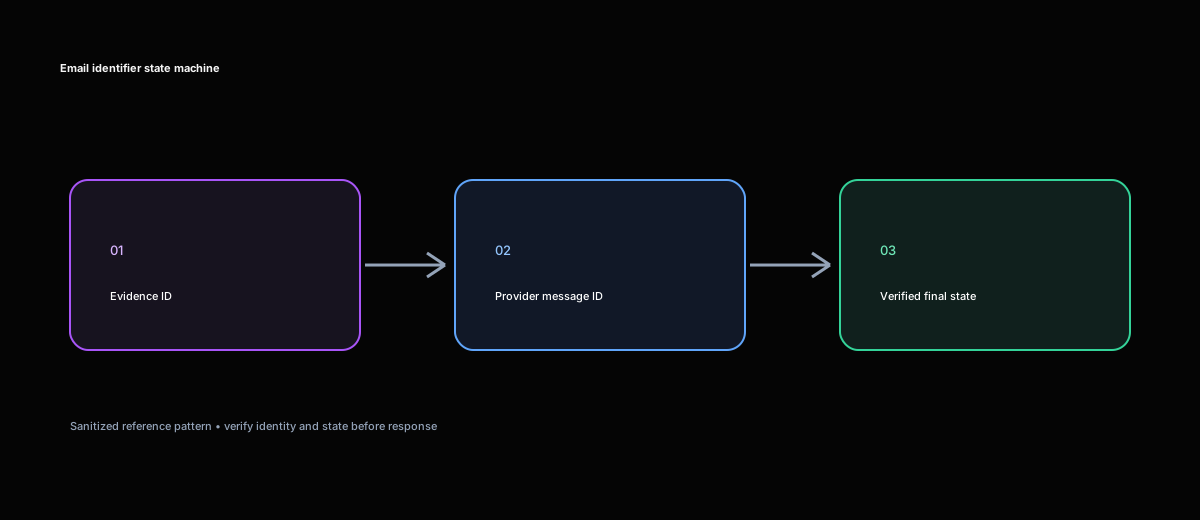
Email identifier state machine: track evidence and provider message identifiers through verified remediation.

Nothing feels more decisive during a phish than a broad search-and-delete across every mailbox. One query, everything matching the sender or subject disappears, and the incident closes before the standup.

Then the review happens. Someone asks how many messages you removed. Then whether you got the legitimate invoice from the same sender that used the same subject line. Then whether any of it touched a mailbox under a legal hold.

"That's what the search matched" is not an answer, and it's the point at which a satisfying remediation turns into an uncomfortable meeting.

There's a well-behaved way to do the same job. It's slower to set up and much easier to defend. What follows is the full identifier picture, every action and what it costs, and the accountability loop that makes the result provable.

A quarantine workflow has two jobs

The first job is containment; the second is accounting: show what the workflow considered, changed, and could not verify.

A move endpoint followed by “phishing email quarantined” can be wrong when:

  • The request used an alert evidence ID rather than the provider message ID.
  • The API accepted a batch but returned per-message failures that were ignored.
  • The action was asynchronous and the initial response represented acceptance, not completion.
  • The message existed in multiple mailboxes, but only one mailbox scope was sent.

A useful workflow makes these states visible. “Quarantine requested,” “quarantine verified,” “already quarantined,” and “not found” are different results, even if all of them reduce immediate exposure.

The identifier taxonomy

“Message ID” is overloaded. Make an identifier table for every input and API call.

IdentifierWho generates itWhere it is validDoes it survive a move?What breaks if you use it incorrectly
RFC 5322 Message-IDSending mail systemInternet headers and message correlationUsually travels with the message content, but it is not necessarily the provider’s lookup keyA provider search may return multiple copies or no object for a header value
Provider message IDEmail-security or mailbox providerThat provider’s message, search, status, or remediation APIsProvider-specific; some systems retain it, others issue a new object ID after a moveThe target returns not found, wrong mailbox, or acts on a different object
Alert evidence IDDetection or XDR platformAlert evidence and incident recordsIt remains an evidence reference, not a mailbox object referencePassing it to a remediation API results in rejection or an accidental lookup miss
Mailbox item IDMailbox API, such as Microsoft GraphOne mailbox and its message resourceStandard Outlook IDs can change when an item is moved; immutable IDs are an opt-in feature with scope limitsA post-move GET with the old ID returns 404 or resource not found
Conversation/thread IDMailbox providerA conversation or thread viewIt may remain associated with a conversation while individual message IDs differA thread ID can select more mail than the one malicious message
Remediation record IDEmail-security or orchestration APIThe action or operation recordIt identifies the action, not necessarily the messageUsing it for a message-status request returns the wrong resource or no resource

The identifier map should travel with the workflow run:

{
  "source_incident_id": "<incident-id>",
  "alert_evidence_id": "<evidence-id>",
  "rfc5322_message_id": "<message-id@example> ",
  "provider": "<email-security-provider>",
  "provider_message_id": "<provider-message-id>",
  "mailbox": "<[email protected]>",
  "conversation_id": "<conversation-id>",
  "remediation_id": "<action-id>"
}

RFC 5322 Message-ID

The Message-ID header is a message-level identifier assigned by the sending system. It is valuable for cross-system correlation because it can appear in message headers, alerts, and forensic exports. It is not automatically the key accepted by a provider’s remediation endpoint.

One malicious message can have the same header in several delivered copies. A forwarded or reconstructed message can have a different header. A search API may expose the header as one property while requiring a provider-specific ID for a move. Preserve it as evidence, but confirm the target API’s identifier contract before using it as an action key.

Provider message ID

In Cisco ETD, the workflow contract consumes email message IDs, and the APIs expose search, remediation/move, and status operations. Treat the provider ID as that provider’s action key, not an XDR incident or evidence ID (Cisco XDR workflow).

Alert evidence ID

The evidence ID belongs to the detection system. It may identify a URL, attachment, observation, or alert record rather than a delivered message. Keep it in the ticket and use it to explain why the message was selected.

Mailbox item ID

A mailbox API usually addresses a message inside a specific mailbox. Scope is part of the identity. <message-id> in mailbox A is not necessarily the same object as <message-id> in mailbox B.

Microsoft documents that ordinary Outlook resource IDs can change when an item is moved. Its immutable-ID feature can provide an ID that remains stable for the lifetime of an item within the same mailbox when the required Prefer: IdType="ImmutableId" header is used consistently. That does not make a mailbox item ID a universal email-security ID, and it does not remove the mailbox scope (Microsoft immutable IDs).

Conversation or thread ID

A conversation ID groups related messages. It is useful for investigation and campaign analysis, but it is usually too broad for a precise quarantine action. A reply, a legitimate earlier message, and a malicious attachment can share a thread. Use the conversation ID to explain relationships, not as a substitute for each message ID.

Remediation record ID

The remediation record identifies the request or action. It is how you find out what the provider tried to do. It is not the message object. Store both:

Message target: <provider-message-id>
Action record: <remediation-id>
Requested action: move to quarantine
Verification query: provider-message-id + mailbox scope

Search is for discovery, not identity

A search such as “sender equals <sender> and subject contains <subject>” can return:

  • The original message
  • Replies and forwards
  • A legitimate message from the same sender
  • Multiple recipients’ copies
  • A copy already moved by a user

Use a two-phase process:

Search
  -> candidate records
  -> validate provider IDs and mailbox scope
  -> freeze target list
  -> remediate exact IDs
  -> verify final state

Cisco’s Message Search API is designed to retrieve message information from ETD using the JWT from the Authentication API. The response schema includes fields that can evolve; Cisco’s documentation has called out changes to URL metadata, which is a good reason to parse named fields defensively rather than depend on one fixed response shape (Cisco Message Search API).

Choose the remediation action deliberately

ActionWhat it is forWhat remains recoverableMain risk
Move to quarantineRemove the message from normal delivery while retaining it for reviewMessage metadata, audit history, and release path where the provider supports themThe message may be in a different mailbox or state than expected
Move to junkReduce exposure while keeping user accessThe message remains in the mailbox and can be restoredUsers may still interact with it
Move to deleted itemsRemove from the inbox with a less final user-facing actionMailbox recovery may remain possibleThe action can be mistaken for confirmed purge
Soft deleteRemove from ordinary views while preserving a recovery pathProvider retention and recovery featuresRecovery rules vary by platform
Hard deleteRemove as permanently as the provider permitsLittle or no normal recoveryHigh blast radius; poor choice when scope is uncertain
Release from quarantineCorrect a false positiveProvider quarantine state and release auditReleasing the wrong message reintroduces risk
ReclassifyChange the provider verdict or classificationAudit record and message state, subject to provider behaviorClassification can change how future policy handles the message
Block sender/domain/URLPrevent future deliveries or connectionsThe original message may still need separate remediationBroad controls can block legitimate mail
Disable a mailbox ruleStop forwarding or persistence behaviorExisting messages remainIt does not remediate already delivered mail

Cisco ETD documents remediation and reclassification through its Move API. The public API supports batches of up to 100 messages per remediation request. That batch capability is useful for a campaign, but it does not remove the need for per-message accounting (Cisco remediation and reclassification API).

Microsoft Graph’s analyzedEmail: remediate API describes actions such as moving mail to junk, deleted items, soft delete, hard delete, or the inbox. The recoverability and permission implications depend on the product and action, so the workflow should record the requested action exactly rather than reporting every move as “quarantined” (Microsoft analyzedEmail remediation).

Separate discovery, authentication, action, and verification

  1. Discovery: collect candidate messages from the incident or search API.
  2. Normalization: map every candidate to the correct provider ID and mailbox scope.
  3. Validation: reject missing, ambiguous, duplicate, or unsupported identifiers.
  4. Authentication: obtain the token and API key required by the target.
  5. Remediation: submit the documented move or reclassification request.
  6. Verification: query status and confirm the resulting folder/action.
  7. Reporting: write per-message outcomes to the source incident and ticket.

Cisco ETD authentication uses client credentials to obtain a token, and the message APIs use the token plus the required API key header. Credentials belong in the integration target or secure variable store, not in a script argument printed to a run log or in a ticket body (Cisco ETD authentication).

Validate and deduplicate the frozen target list

[
  {
    "provider": "<provider>",
    "mailbox": "<[email protected]>",
    "provider_message_id": "<provider-message-id>",
    "rfc5322_message_id": "<message-id@example>",
    "requested_action": "quarantine",
    "source_incident_id": "<incident-id>",
    "selection_reason": "confirmed malicious attachment"
  }
]

Validate:

  • Provider ID is present and has the expected shape
  • Mailbox or tenant scope is present when the API requires it
  • The source incident contains the evidence that selected the message
  • The requested action is supported for the target
  • Duplicate provider IDs are removed within the same scope
  • The message is not already in the desired final state
  • A conversation or alert ID has not been substituted for the provider ID

Deduplicate on (provider, mailbox, provider_message_id), not only on subject or RFC header. Keep duplicate evidence references in a separate list if they explain why the message appeared more than once.

If one record is malformed, mark that record invalid. Depending on policy, continue with valid records, but report the batch as partial. Do not silently discard the invalid item or claim that the whole campaign was remediated.

Process one message with a state machine

identified
  -> validated
  -> remediation requested
  -> remediation accepted
  -> verification pending
  -> verified
  • quarantined
  • moved_to_quarantine
  • already_quarantined
  • moved_to_junk
  • released
  • not_found
  • invalid_identifier
  • permission_denied
  • rate_limited
  • rejected
  • failed
  • pending_verification
  • skipped_by_policy

Keep the action and verification records separate:

{
  "provider_message_id": "<provider-message-id>",
  "requested_action": "quarantine",
  "request_state": "accepted",
  "remediation_id": "<action-id>",
  "verification_state": "pending",
  "verified_folder": null,
  "last_checked_at": "<timestamp>"
}

Do not convert an HTTP 2xx response into quarantined unless the provider’s response itself guarantees completion or a follow-up status check confirms it.

Cisco ETD’s Status API returns recent message actions, including action, folder, initiator, and status. That is the type of response a verification step should use. Cisco also notes that status should be checked after remediation and reclassification has had time to apply (Cisco ETD Status API).

The asynchronous acceptance-versus-completion problem

A request can be accepted before the message moves. That creates a race between the automation run and the provider’s message state.

submit move/quarantine request
  -> save request response and action ID
  -> wait according to provider behavior
  -> query message status
  -> if desired state, mark verified
  -> if still pending, wait with backoff
  -> if final failure, mark failed
  -> if timeout, mark pending_verification and alert

The verification loop must not blindly resubmit the action. Verification retries and remediation retries are different operations.

A provider status response may show a previous action, such as a user move to quarantine, followed by an API action. Select the action associated with the current remediation request using its timestamp, action ID, initiator, or correlation fields. Do not assume that the newest entry is yours if several actors are operating on the mailbox.

Overall result: partially completed
- <message-a>: quarantine verified
- <message-b>: already quarantined by user action
- <message-c>: request accepted; verification pending
- <message-d>: provider message ID not found
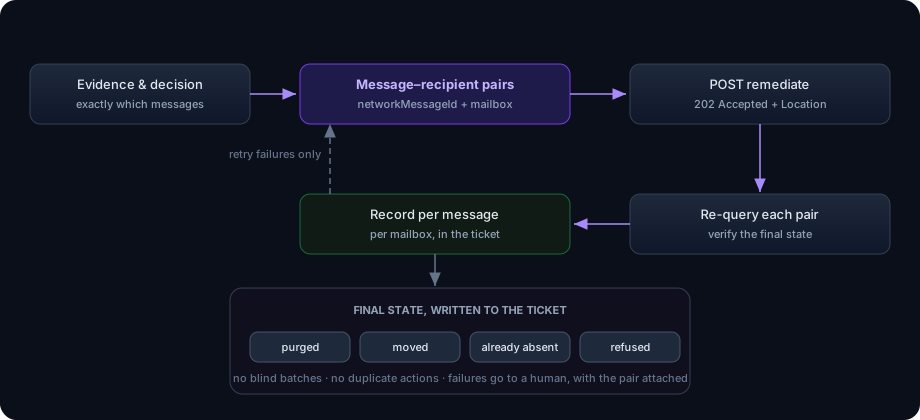
Targeted remediation loop: evidence produces message-recipient pairs, the remediate call returns 202, each pair is re-queried for its final state, failures are retried once and then logged for a human.

Rate limits, throttling, and backoff

Email remediation is often bursty. A campaign can produce many message IDs at once, while the provider limits requests by tenant, API key, or endpoint.

Cisco ETD documents rate limiting for its public APIs: the current documentation describes a per-tenant rate of 2 requests per second, a burst limit of 4 requests per second, and a daily quota of 10,000 requests. Verify current limits before production deployment because provider limits can change. Batch size and request rate are separate constraints: batch size limits how many message IDs one request may contain; request rate limits how quickly requests may be sent (Cisco ETD rate limiting).

for each batch of up to provider_batch_limit:
    wait for rate-limit window
    submit batch
    record per-message response if available
    schedule verification

Backoff should be different by failure:

FailureAction
Network reset before request transmissionRetry with exponential backoff and a bounded attempt count
Timeout after request transmissionVerify whether the action exists before retrying
401 or expired tokenRefresh once through the authentication path; do not loop forever
403 or permission failureStop and alert; repeating does not grant permission
404 message not foundRe-check provider, mailbox scope, and identifier mapping; do not broaden search automatically
429 or rate limitHonor Retry-After when supplied and reduce concurrency
Provider 5xxReconcile before retrying because the request may have been accepted
Per-message validation errorMark only that message invalid; continue with valid records when policy allows
Batch-level rejectionSplit only if the provider documents that the error can be isolated; preserve the original batch record

Do not use a tight loop with sleep(1) and call it throttling. The queue needs a rate budget, backoff, and a record of which message IDs were in each request.

Per-message versus batch remediation

Per-message requests are easier to audit and isolate when the batch is small or the provider returns weak per-item results. They cost more requests and may hit rate limits sooner.

Batch requests are efficient for a confirmed campaign. They reduce overhead, but a batch-level error may make it unclear which item failed unless the response includes per-message results. The workflow should preserve:

  • Batch ID
  • Ordered list of message IDs in the batch
  • Request timestamp
  • Provider response
  • Per-message result, if returned
  • Verification status for each item

A batch is not one message. Never write one batch result over every item.

A practical policy is:

  • Use per-message mode for high-risk or ambiguous selections.
  • Use provider-supported batch mode for confirmed campaign IDs.
  • Split a rejected batch only when the error is likely item-specific and the provider allows retry.
  • Keep the original batch and every split attempt in the run record.
  • Mark the roll-up partial if any item remains uncertain.

Identifier lifecycle and moves

The identifier lifecycle is where many post-remediation checks fail.

alert evidence created
  -> provider message discovered
  -> provider message ID stored
  -> remediation action submitted
  -> provider moves or reclassifies message
  -> status queried using provider rules
  -> final state recorded

A message move can change the object you query. Microsoft documents immutable IDs as an opt-in, header-based feature with scope and mailbox constraints. If a workflow uses Microsoft Graph, decide before the first GET whether it will use ordinary IDs or immutable IDs, and apply the choice consistently to every relevant request (Microsoft immutable IDs).

Microsoft’s move operation creates a new copy in the destination folder and removes the original message from the source folder. That means a post-move lookup using the old ordinary ID can fail even though the move succeeded (Microsoft message move).

Email-security platforms may expose a stable message ID across a move, or they may expose a new action/status relationship instead. Do not infer the behavior from Microsoft Graph or from another provider. Test and document it for the target.

Store both pre-action and post-action references when available:

{
  "before": {
    "provider_message_id": "<old-id>",
    "folder": "inbox"
  },
  "action": {
    "remediation_id": "<action-id>",
    "requested": "quarantine"
  },
  "after": {
    "provider_message_id": "<new-id-or-old-id>",
    "folder": "quarantine",
    "status": "succeeded"
  }
}

Worked scenario: one phish

An incident contains one confirmed message and a provider message ID. The workflow:

  1. Validates the ID and mailbox scope.
  2. Checks the current status to avoid moving an already-remediated message.
  3. Submits a quarantine request with the source incident as the correlation context.
  4. Saves the action response.
  5. Waits and checks status.
  6. Records the final folder and action status.
  7. Writes the result to the source incident and ServiceNow.

Ticket entry:

Message: <provider-message-id>
Mailbox: <[email protected]>
Requested action: quarantine
Request state: accepted
Verification state: succeeded
Final folder: quarantine
Source incident: <incident-id>

If status is still pending at the run deadline, the result is pending_verification, not quarantined.

Worked scenario: a multi-mailbox campaign

A search finds the same campaign in three mailboxes. The visible subject and RFC Message-ID are similar, but each mailbox has a different provider object. The target list must contain three scoped records:

(<provider>, <mailbox-a>, <message-id-a>)
(<provider>, <mailbox-b>, <message-id-b>)
(<provider>, <mailbox-c>, <message-id-c>)

A workflow that deduplicates only on the RFC header may reduce the set to one and leave two copies delivered. A workflow that sends a mailbox ID to the wrong mailbox may return not found.

Use a batch only after all three provider IDs are validated. Report each result individually. If one mailbox rejects the action, the campaign roll-up is partial.

Worked scenario: false positive caught late

A message is quarantined automatically. An analyst later determines it was legitimate. Release is a separate action and should carry a separate approval and correlation record:

Original action: quarantine
Original remediation ID: <quarantine-action-id>
Correction: release
Reason: false positive confirmed
Approver: <analyst>
Release action ID: <release-action-id>
Verification: message released to intended folder

Do not edit the original ticket description to make it look as though quarantine never happened. Append the correction and retain the original action history.

If a provider supports reclassification, record that action separately from moving the message. Changing the verdict and changing the folder may have different audit semantics.

Worked scenario: the user already moved the message

The workflow receives a message ID, but the user has already moved the message to quarantine. The status history shows a manual move before the automation request.

The correct result is already_quarantined or already_remediated, depending on the provider’s vocabulary. The workflow can avoid a duplicate move, record the manual initiator, and close the containment branch while still reporting the source detection.

If the user moved the message to deleted items instead, decide whether that meets policy. “Not in inbox” is not automatically equivalent to “quarantined.” The ticket should state the actual folder and whether the provider considers that state sufficient.

What an auditable record must contain

For every message action, preserve:

  • Source incident ID and link
  • Alert evidence ID
  • RFC Message-ID, when available
  • Provider name and region, when relevant
  • Provider message ID
  • Mailbox or recipient scope
  • Conversation ID, if used for context
  • Requested action and target folder
  • Remediation/action record ID
  • Request timestamp
  • HTTP status or provider response status
  • Per-message result
  • Verification query and timestamp
  • Final folder/state
  • Initiator or actor, when returned
  • Retry count and throttling events
  • Failure reason, if any
  • Ticket and work-note references

Do not store bearer tokens, API keys, client secrets, mailbox passwords, or raw authorization headers in this record. The audit trail should prove what happened without becoming a second credential store.

A compact event record might look like:

{
  "source_incident_id": "<incident-id>",
  "provider": "<email-security-provider>",
  "mailbox": "<[email protected]>",
  "provider_message_id": "<provider-message-id>",
  "rfc5322_message_id": "<message-id@example>",
  "requested_action": "quarantine",
  "remediation_id": "<action-id>",
  "request_state": "accepted",
  "verification_state": "succeeded",
  "final_folder": "quarantine",
  "requested_at": "<timestamp>",
  "verified_at": "<timestamp>"
}

Keep tickets readable

A ticket should show the roll-up and the individual messages. Do not paste a raw API response with tokens, nested metadata, or every search field.

-- Email remediation summary
Source incident: <incident-id>
Overall result: partially completed

-- Messages
- <provider-message-id-a>: quarantine verified
- <provider-message-id-b>: already quarantined by user action
- <provider-message-id-c>: pending verification
- <provider-message-id-d>: invalid provider ID; no action sent

-- Detection evidence
- Source: <email-security-provider>
- Sender: <sender>
- Subject: <subject>
- Indicator: <URL or attachment indicator>

Use one line per message. Use the provider ID the responder can search in the product, and include the RFC header as supporting evidence when it is available. If a post-move ID changed, show both old and new references.

Post the same roll-up result to the source incident. If remediation succeeded but ticket creation failed, write the action outcome to the source incident and queue the ticket for reconciliation. If ticket creation succeeds but verification is pending, the ticket must say pending.

Prevent accidental scope expansion

A missing provider message ID should not trigger a broad fallback such as “all messages from this sender.” That is a different action with a different risk profile. It needs a separate policy, search window, approval, and audit record.

Likewise, one malicious message should not become a mailbox-wide purge because the workflow cannot resolve its exact target. Targeted remediation is valuable because it keeps the blast radius tied to confirmed evidence.

Make the selection boundary visible:

Discovery window: <start> to <end>
Mailboxes considered: <scope>
Candidates found: <count>
Validated targets: <count>
Remediation targets: <count>
Excluded: <reason>

The counts here are run facts, not marketing statistics. They help the analyst understand what the workflow did and did not consider.

Test the negative paths

A serious test plan includes:

  • One valid provider message ID
  • A valid RFC Message-ID that is not accepted as a provider ID
  • Duplicate provider IDs in one incident
  • The same RFC header in multiple mailboxes
  • A missing provider ID
  • A malformed provider ID
  • A conversation ID passed accidentally as a message ID
  • A message already in quarantine
  • A message the user moved to deleted items
  • A message no longer found
  • A multi-mailbox campaign with one failure
  • A remediation request accepted while status remains pending
  • A timeout after the provider may have accepted the action
  • A token expiration during a batch
  • A permission failure
  • A rate limit response
  • A provider 5xx response
  • A message whose provider ID changes after a move
  • A false positive requiring release and reclassification
  • A retry of the same incident and message ID
  • A ticket-creation failure after remediation succeeds
  • A work-note failure after ticket creation

For each test, check the provider’s message state, the workflow run, the source incident, and the ServiceNow record. The workflow is ready when it reports partial results accurately and never turns uncertain state into a false success. Keep these negative paths in the regression set whenever a provider response shape, identifier rule, or rate limit changes.

Troubleshooting checklist

The API says success, but the message is still in the inbox

Check what “success” means for that endpoint. It may mean the request was accepted. Retrieve the action or status record, wait according to provider behavior, and verify the folder. Confirm the provider message ID and mailbox scope.

The provider returns not found

Check the identifier taxonomy first. Was an alert evidence ID, RFC header, conversation ID, or remediation ID passed where a provider message ID was required? Check the mailbox, region, tenant, and whether the message was moved and received a new object ID.

One message in a batch failed, but the ticket says all succeeded

Inspect the batch response and preserve per-message results. If the provider returns only a batch-level result, use a documented reconciliation method or split the batch under policy. Never copy the batch result to every item without evidence.

The same message was remediated twice

Check the correlation key and the timeout branch. Search for an existing action before resubmitting. Separate remediation retries from status-verification retries, and treat an already-remediated message as a state to report, not an error to repeat.

A post-move lookup returns resource not found

For mailbox APIs, the ordinary item ID may have changed when the message moved. Use the provider’s documented immutable-ID or destination lookup behavior, and retain the pre-move ID plus the remediation record. Microsoft documents this behavior for Outlook resource IDs (immutable IDs; message move).

The workflow quarantined a legitimate message

Do not erase the original action. Record a release or reclassification action with a new action ID, reason, approver, and verified final state. Add a policy change only after reviewing why the original selection passed.

ETD authentication fails

Check that the client credentials were generated with the required administrative role, that the API region matches the tenant, that the API key is attached to the request, and that the bearer token has not expired. Keep the credential values out of the run log and ticket (ETD authentication).

The workflow is throttled

Check request rate, batch size, concurrent workers, and retry behavior. Honor provider guidance and Retry-After when supplied. Do not respond to a 429 with an immediate burst of retries.

Public references

ABOUT THE AUTHOR

Technoxi Security Engineering

Email Security Automation

We build phishing remediation that can prove, after the fact, exactly which messages it touched and what state each one ended in.