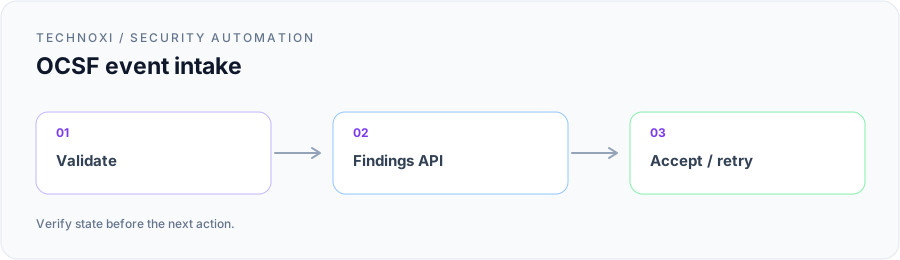
A customer had a network detection source that Cisco XDR did not ingest natively. Our shared project goal sounded straightforward: turn each source alert into an OCSF Detection Finding, retain its network evidence, and make it visible under a recognizable custom source so the customer’s existing investigation and correlation workflows could use it.
The source already supplied the useful facts—rule identity, event time, internal and external endpoints, protocol, and severity. We expected the mapping to be the hard part. Instead, the first request failed before OCSF validation, and the next one failed with an authorization message that pointed us in the wrong direction.
Two failures narrowed the real contract
We initially posted to the host exposed by interactive API documentation using a normal Bearer token. The response was not an OCSF complaint because that host was a documentation proxy protected by AWS SigV4, not the production destination for an OAuth-authenticated producer. For the customer’s North America tenant, the actual Findings Intake endpoint was:
https://findings.us.security.cisco.com/api/v1/detection_findings
We kept the raw request and response, changed only the host, and reached the authorization layer. The second request used a client-credentials token requested with an explicit scope. It returned:
403 explicit deny in an identity-based policy
That sounded like a customer IAM policy problem. Before escalating, we compared the token request with the bare client-credentials flow. Removing the scope parameter allowed the same client to reach normal intake validation. We treated that as an observed requirement of this path—not a general claim about Cisco authorization—and encoded it in a compatibility test.
The investigation then exposed a third trap. We inspected an event after XDR had processed it and copied plausible outer fields such as product_uid, xdr_tenant_uid, version, and time_iso8601 into the next input. Intake returned 422 unexpected property. Adding metadata.labels produced 400 metadata.labels must contain exactly one known label. The processed representation was not a template for the ingestion contract.
Those failures gave the customer and our engineers a useful boundary: the adapter would own source identity, stable UIDs, source facts, and delivery. XDR would own its processing envelope. We would add fields only when the intake schema or a controlled test justified them.
Giving the source a stable home
The incoming events needed an XDR-side identity. We created a Custom OCSF Event Source integration module instance with a descriptive, anonymized display name. Its module instance ID became a secured routing value supplied in the header:
module-instance-id: <your-module-instance-id>
The ID is not the tenant UID and does not belong in the JSON body. Pointing at the wrong instance could produce authenticated data under the wrong source, so deployment configuration paired the module instance with the endpoint region and API client. The team kept all three out of source control.
We considered a Custom Security Event Workflow, which can create the module instance and source relationship in XDR Automate, versus a direct producer. The customer already operated the source-side adapter and needed controlled backfill and retry behavior, so we used direct intake. The workflow route remained suitable for workflow-managed mappings; this project did not need to insert another runtime merely to create the source identity.
Authentication used the OAuth2 client-credentials exchange without an explicit scope:
export CUSTOM_SOURCE_CLIENT_ID='<your-client-id>'
export CUSTOM_SOURCE_CLIENT_PASSWORD='<your-client-password>'

curl -sS -X POST \
  -u "$CUSTOM_SOURCE_CLIENT_ID:$CUSTOM_SOURCE_CLIENT_PASSWORD" \
  -H 'Content-Type: application/x-www-form-urlencoded' \
  -H 'Accept: application/json' \
  -d 'grant_type=client_credentials' \
  'https://visibility.amp.cisco.com/iroh/oauth2/token'
The producer sent the resulting short-lived token as Authorization: Bearer <access-token>, plus Content-Type: application/json and module-instance-id. It generated an x-request-id and logged that alongside source IDs and a payload hash. Credentials never entered the OCSF payload, finding description, or request log.
This configuration was reviewed jointly because each value answered a different operational question. Region selected the service boundary, the API client established who could submit, and the module instance established which source owned the resulting finding. Keeping them separate also made promotion between test and production predictable: deployment could change routing and credentials without changing the event mapper or its UID algorithm. A preflight request with one known-safe synthetic record verified that combination before any backlog was released.
Mapping one source alert into one evidence bundle
The direct endpoint expects an array of bundles, each containing an events array. It does not accept a lone event object or the detection_findings wrapper used by another custom-detection path. We chose one Detection Finding anchor per source alert and included its supporting Network Activity in the same bundle.
The anchor used class_uid 2004, type_uid 200401, activity_id 1, and category_uid 2. Network Activity used class_uid 4001, type_uid 400100, activity_id 0, and category_uid 4. Source time was converted to epoch milliseconds rather than replaced with ingestion time. Internal and external addresses remained in src_endpoint and dst_endpoint respectively so downstream readers did not have to reconstruct direction.
Metadata stayed deliberately small:
{
  "metadata": {
    "uid": "<stable-event-uid>",
    "product": {
      "uid": "custom-ids",
      "name": "Custom IDS",
      "vendor_name": "Your Security Team"
    },
    "version": "1.0.0"
  }
}
The finding UID was a deterministic hash of the immutable source event ID. The activity received its own deterministic UID, and a compact reference to that UID appeared in finding_info.related_events. That decision supported retries and corrections: a changed title or rule description would not create a second finding. Cisco’s custom security event workflow guidance describes correction by resubmitting a Detection Finding with the same finding_info.uid; keeping the activity UID stable also gave us predictable source-side reconciliation.
This was the core adapter used in the project, with public-safe placeholders:
#!/usr/bin/env python3
import hashlib
import os
import time

import requests

AUTH_URL = "https://visibility.amp.cisco.com/iroh/oauth2/token"
FINDINGS_URL = "https://findings.us.security.cisco.com/api/v1/detection_findings"


def token():
    response = requests.post(
        AUTH_URL,
        auth=(os.environ["CUSTOM_SOURCE_CLIENT_ID"], os.environ["CUSTOM_SOURCE_CLIENT_PASSWORD"]),
        headers={"Content-Type": "application/x-www-form-urlencoded", "Accept": "application/json"},
        data="grant_type=client_credentials",
        timeout=30,
    )
    response.raise_for_status()
    return response.json()["access_token"]


def uid(value):
    return hashlib.sha256(value.encode("utf-8")).hexdigest()


def make_bundle(source):
    finding_uid = uid("custom-ids:finding:" + source["event_id"])
    activity_uid = uid("custom-ids:activity:" + source["event_id"])
    event_time = source["event_time_ms"]
    product = {"uid": "custom-ids", "name": "Custom IDS", "vendor_name": "Your Security Team"}

    related_activity = {
        "type_uid": 400100,
        "uid": activity_uid,
        "type_name": "Network Activity: Unknown",
        "observables": [
            {"type_id": 2, "name": "src_endpoint.ip", "value": source["src_ip"], "type": "IP Address"},
            {"type_id": 2, "name": "dst_endpoint.ip", "value": source["dst_ip"], "type": "IP Address"},
        ],
    }
    finding = {
        "class_uid": 2004,
        "type_uid": 200401,
        "activity_id": 1,
        "category_uid": 2,
        "time": event_time,
        "severity_id": 4,
        "severity": "High",
        "finding_info": {
            "uid": finding_uid,
            "title": source["rule_name"],
            "desc": "%s matched %s to %s:%s" % (
                source["rule_name"], source["src_ip"], source["dst_ip"], source["dst_port"]
            ),
            "types": ["Network"],
            "created_time": event_time,
            "modified_time": event_time,
            "related_analytics": [{
                "type_id": 1,
                "uid": "custom-ids::" + source["rule_id"],
                "name": source["rule_name"],
                "type": "Rule",
                "version": "1",
            }],
            "related_events": [related_activity],
        },
        "device": {"type_id": 0, "type": "Unknown", "ip": source["src_ip"], "mac": source["src_mac"]},
        "metadata": {"uid": finding_uid, "product": product, "version": "1.0.0"},
    }
    activity = {
        "class_uid": 4001,
        "type_uid": 400100,
        "activity_id": 0,
        "category_uid": 4,
        "time": event_time,
        "src_endpoint": {
            "ip": source["src_ip"], "port": source["src_port"],
            "network_scope_id": 1, "network_scope": "Internal", "mac": source["src_mac"],
        },
        "dst_endpoint": {
            "ip": source["dst_ip"], "port": source["dst_port"],
            "network_scope_id": 2, "network_scope": "External",
        },
        "connection_info": {
            "protocol_name": source["protocol"], "protocol_num": 6,
            "direction_id": 0, "direction": "Unknown",
        },
        "dispositions": [{"disposition": "Detected", "disposition_id": 1}],
        "metadata": {"uid": activity_uid, "product": product, "version": "1.0.0"},
    }
    return {"events": [finding, activity]}


def push(bundle):
    response = requests.post(
        FINDINGS_URL,
        headers={
            "Authorization": "Bearer " + token(),
            "Content-Type": "application/json",
            "module-instance-id": os.environ["CUSTOM_SOURCE_MODULE_INSTANCE_ID"],
            "x-request-id": "custom-ids-" + str(int(time.time())),
        },
        json=[bundle],
        timeout=30,
    )
    print(response.status_code, response.text[:1000])
    response.raise_for_status()
The production wrapper validated required source fields before calling make_bundle, retained the uncompressed payload hash, and persisted the source event ID, finding UID, activity UID, request ID, batch membership, and response. We placed the Detection Finding first for readability but did not use array position as identity.
Proving more than transport success
Findings Intake returns 202 Accepted when it accepts a request for processing. Our original definition of done stopped there; the revised acceptance test had four checkpoints. The producer record had to show source ID, stable UIDs, module instance reference, request ID, hash, and response. The intake body had to contain the expected result or any per-finding errors. An analyst then searched Investigate → Detection Findings by custom source and a narrow source-event time range, opened the finding, and confirmed its fields and related Network Activity. Incident correlation was checked separately.
That distinction mattered to the customer. A finding visible with no related incident was a successful ingestion, not a failed push. Correlation could legitimately decide not to group it. Conversely, a 202 without a visible, correct finding was not yet a successful project outcome.
We tested corrections by changing a description and resubmitting the same finding UID, then checking the updated finding rather than accepting a duplicate. We tested a random UID on retry and confirmed our producer-side guard rejected it. We also sent the wrong outer wrapper, processed-only fields, unsupported metadata labels, reversed endpoints, a missing module instance, an expired token, and a token requested with scope. Validation errors (400 or 422) were never retried unchanged.
Delivery tests covered a connection failure, timeout after transmission, 401, 403, 429, and 5xx. A 401 refreshed once. A 403 stopped for authorization review. A 429 honored Retry-After and reduced concurrency; the public intake material documents that response but not a numeric request limit, so we did not invent one. Ambiguous timeouts and 5xx responses reconciled by stable finding UID before resubmission.
For batching, we kept one source finding per bundle and sent an array of bundles. Small batches made individual failures and replay straightforward. Optional gzip changed transport size, not the schema; audit records still used the uncompressed payload hash. Backfill preserved source timestamps and deterministic UIDs, so an outage did not turn replayed alerts into new detections.
Customer outcome and shared lesson
The completed source appeared in Detection Findings under the agreed custom name, with the source rule, endpoint observables, and related Network Activity available to investigators. The customer could distinguish intake from correlation, replay a failed delivery without duplicating a finding, and correct source details while preserving identity. Operations had concrete evidence for every handoff instead of treating a 202 as the end of the story.
The most useful lesson was not about one OCSF field. Custom ingestion crosses several contracts: documentation host versus production host, OAuth client versus scope behavior, module instance versus tenant identity, intake schema versus processed output, and acceptance versus visibility. Our early failures came from collapsing those boundaries. The durable implementation became intentionally boring: a stable source identity, a minimal validated bundle, deterministic UIDs, bounded retries, and independent proof that the finding landed. That was what turned a promising API demo into a source the customer could operate.