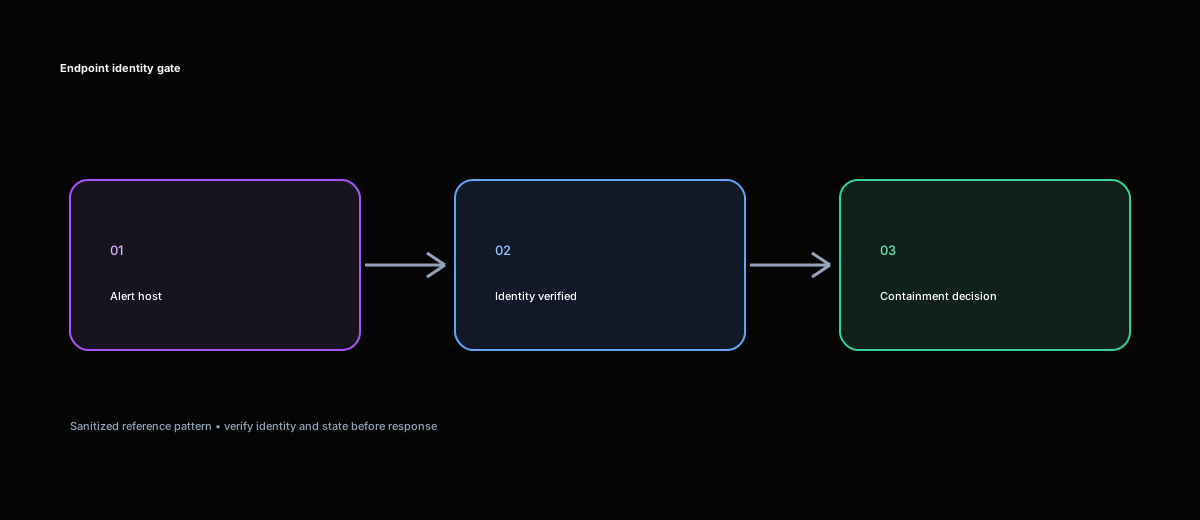
The customer’s endpoint platform already exposed an isolation API, and their orchestration tool could call it. The initial workflow was correspondingly short: receive an alert, extract a device identifier, submit isolation, and create a ticket. Nothing in that sequence was technically unusual. The risk was hidden in the assumption that the identifier represented the machine everyone thought it did, and that every machine should receive the same response.
During design review, we followed several anonymized alert shapes through that sequence. A production server could enter the desktop branch because its endpoint type was Virtual. A re-enrolled workstation could retain an old identifier in the incident. A shared administrative host could be isolated while responders were using it. A successful API response could be reported as completed containment even though the provider had only queued the action.
The customer requirement was therefore not “automate endpoint isolation.” It was to contain eligible workstations quickly without turning a wrong identity, critical asset, maintenance window, or uncertain API result into a second incident. Every automatic action had to explain why the device was eligible. Every non-action had to be a visible policy result rather than a mysterious failed run. Release had to be treated as an auditable workflow too.
Investigating the decision before the API call
We began by separating facts that the original draft workflow had combined. A source incident identifies an observed asset. The endpoint platform resolves a provider device record. Inventory describes ownership and business purpose. Change data may show a maintenance window. Detection policy decides whether the evidence is strong enough. None of those sources can silently stand in for another.
The first practical finding was that “endpoint” was too broad an operational class. An employee workstation, executive laptop, jump host, domain controller, and production server might all appear through the same connector, but their isolation blast radii were entirely different. We did not want the workflow to infer class from names such as LAPTOP-01 or APP-01, so we compared endpoint metadata, operating system, inventory, ownership, and incident context.
One representative case returned this combination:
Raw endpoint type: Virtual
Operating system: Windows Server
Operational class: Server
Desktop isolation: not eligible
Reason: server workload requires server response policy
Preserving both raw values mattered. If we retained only Virtual, a later maintainer might reasonably assume virtual desktop. If we retained only the derived class, an analyst could not see why the policy selected the server path.
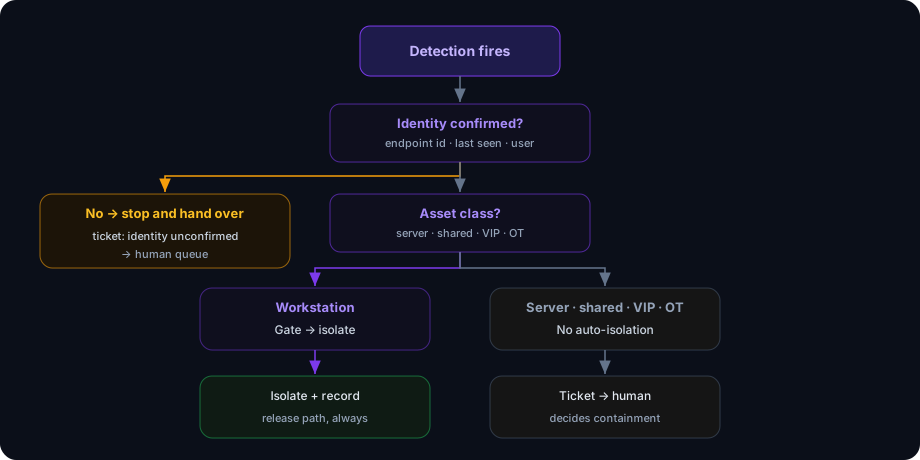
Identity posed the highest-consequence failure. A valid device ID can still point to the wrong host after rebuild, offboarding, re-enrollment, or stale correlation. We required the workflow to resolve the provider record and retain the request ID, current hostname, operating system, device group or business service, agent health, last-seen time, source incident, and existing isolation state. If the incident said HOST-A and the provider returned HOST-B, the branch stopped. The workflow did not “correct” the ticket after acting.
Asset resolution: confirmed
Incident hostname: HOST-A
Endpoint hostname: HOST-A
Device ID: <device-id>
Operating system: Windows 11
Asset class: employee workstation
Identity decision: eligible to continue
A missing record also stopped automatic containment. We explicitly rejected fuzzy hostname search and using an identifier from a different connector as a substitute. Where an approved inventory relationship connected an old and new ID, the workflow recorded both and required review; a name match alone was not authority to disrupt a device.
Collaborating on a containment policy
Once we could describe the target accurately, we worked with security operations and service owners on the harder question: what should happen to it? The answer was not always full isolation.
A confirmed workstation communicating with an attacker might justify full isolation. A shared jump host might need credential revocation, session draining, and selective network controls so responders remain connected. A production server might be removed from a load balancer or restricted at a firewall rather than isolated by its endpoint agent. For a domain controller, credential and token action plus a narrow network block could be safer than interrupting authentication, DNS, and replication.
We represented the provider-specific modes in a small internal vocabulary:
requested_scope: full | selective | unmanaged | vendor_specific
management_path: expected | at_risk | unknown
verification_state: pending | succeeded | failed | unknown
The translation remained adapter-specific. Cisco Secure Endpoint exposes a PUT to start isolation and a DELETE to stop it (Cisco documents both calls). Microsoft Defender for Endpoint accepts Full, Selective, or UnManagedDevice in its isolate request (Microsoft API reference). We did not treat a failed lookup as evidence that a device was unmanaged, and we did not imply that similarly named vendor modes had identical network behavior.
Exceptions became policy data rather than scattered comments or one-off code branches. The evaluated set included executive assets, identity infrastructure, production servers, shared hosts, emergency systems, maintenance windows, and devices already under another containment action. Crucially, “not an exception” differed from “exception lookup failed.” If ownership or change data could not be checked, the workflow routed to review or a pre-approved narrower response.
The decision output needed to explain itself:
Containment decision: skipped
Reason: approved maintenance window
Window reference: <change-id>
Action: no isolation request sent
Next review: <timestamp>
This changed the meaning of a successful workflow. For an eligible workstation, success could mean a verified isolation. For a domain controller or VIP asset, success could mean a documented skip and a correctly routed approval. A red error was reserved for a process failure, not a safe policy decision.
Implementing identity, action, and state separately
The implementation followed the decisions rather than leading them. It received and correlated the incident, resolved identity, classified the asset, checked exceptions and maintenance state, evaluated the detection threshold, looked for an existing action, selected scope, submitted the request, and then tracked the provider result. Ticket updates used the existing incident correlation instead of creating a fresh record for each attempt.
For Microsoft Defender for Endpoint, the documented request shape remained small:
POST https://api.security.microsoft.com/api/machines/{id}/isolate
Authorization: Bearer <token>
Content-Type: application/json
{
  "Comment": "Contain device for confirmed endpoint detection <incident-id>",
  "IsolationType": "Full"
}
A 201 Created response means that a machine-action resource was created; it does not prove the endpoint is isolated. We saved the returned action ID and queried action status. The product’s device-group access, remediation permissions, operating-system support, and documented limits remained part of deployment validation. Full VPN routing also required care because Microsoft warns that isolation can affect connectivity to the Defender service; preserving the management path is necessary both to verify and release a device.
Our orchestration adapter received a provider-neutral request:
request = {
    "target_id": device_id,
    "scope": "full",
    "comment": f"Contain for source incident {incident_id}",
}

result = endpoint_adapter.isolate(request)
Before that call, the workflow checked a durable correlation record:
{
  "source_incident_id": "<incident-id>",
  "device_id": "<device-id>",
  "requested_action": "isolate",
  "requested_scope": "full",
  "request_id": "<local-action-key>",
  "provider_action_id": "<provider-action-id>",
  "requested_at": "<timestamp>",
  "verification_state": "pending",
  "ticket_reference": "<ticket-number>"
}
The local action key made repeated workflow runs idempotent even when a provider did not offer a usable idempotency key. If an action already existed for the source incident, device, and scope, the workflow monitored it rather than submitting another. A containment timeout also could not cause a duplicate ServiceNow incident: endpoint action and ticket update were separate side effects with separate reconciliation states.
After submission, we recorded accepted, not succeeded, and polled with bounded backoff. Pending remained pending until a final provider state or an operational timeout:
Isolation request: accepted
Isolation verification: pending
Provider action ID: <action-id>
Next check: <timestamp>
Batch handling preserved one state per device. A throttled host, policy skip, identity mismatch, and successful isolation could coexist in the same source case. We sized concurrency against provider guidance; Microsoft currently documents limits for this API, but the implementation treated those values as deployment configuration to validate rather than a timeless constant. Authentication and permission failures stopped immediately, rate limits waited according to provider guidance, and ambiguous timeouts triggered status reconciliation before any retry.
Exercising failure paths before enabling action
The project’s most useful test cases were the ones where no isolation request should leave the orchestrator. We tested a VIP laptop and confirmed that the ownership exception produced an approval task. We classified a virtual Windows server as a server, not a desktop. A lab domain controller followed the server-response policy. A shared jump host proposed a narrower action. An endpoint under a maintenance window recorded the change reference and next decision time.
We then corrupted identity inputs. A missing device ID produced insufficient_context. A stale ID produced not_found. A valid ID resolving to a different hostname produced identity_mismatch. None fell back to partial-name search, and none called isolate. For a re-enrolled endpoint, old and new IDs were retained with the verified inventory relationship, but containment waited for review.
Network and provider failures tested idempotency. We simulated a connection failure before submission, an ambiguous timeout after submission, a repeated source event, an action already in progress, and an already isolated device. The ambiguous timeout was the key case: the workflow queried provider action state before deciding whether another request was safe. We also tested a pending action that later succeeded, a final failure, and a throttled multi-device run. Roll-up status stayed partial until every device reached an explicit state.
Release received the same treatment. It required the original action reference, reason, approval, completed remediation or credential work, monitoring plan, and recovery owner. Microsoft exposes release as a separate API action (release-device API), which matched our design: release was not a boolean toggle hidden inside the original run.
Release decision: approved
Device: HOST-A
Isolation action: <action-id>
Reason: forensic collection complete; credentials rotated
Release method: provider unisolate action
Verification: agent healthy; expected network path restored
Owner: <team>
Timestamp: <timestamp>
After release, the test checked that the agent reported healthy, the expected network path returned, the source case recorded the result, and the endpoint did not immediately resume the suspicious connection. An API success by itself was insufficient.
For every test, we compared the endpoint console, workflow run, and source or ticket record. The work note included the source incident, resolved device identity, raw and operational class, policy decision, requested scope, provider action ID, request state, verification state, and next owner. It never included tokens, client secrets, or authorization headers.
The outcome: automation with a safe negative path
The finished workflow still isolated eligible workstations quickly, but speed was no longer purchased by collapsing uncertainty. Identity had to match. Classification and exception checks had to complete. Accepted actions were tracked to final state. Repeated events converged on the same action and ticket. Critical, shared, stale, or ambiguous assets produced a deliberate review path with enough evidence for the next person to decide.
The shared lesson was that the isolation call is the least interesting part of endpoint containment. The engineering work lives in target identity, blast radius, policy ownership, asynchronous state, idempotency, and recovery. We considered the project successful not only when a confirmed workstation was isolated, but when the system declined to isolate the wrong machine for a reason an analyst could see and trust.