At 09:17, an analyst opened a ServiceNow incident created by the customer’s XDR workflow. The automation had technically succeeded: ServiceNow had accepted the request and returned a record. The analyst still could not investigate from it.
The description was a long paragraph copied from the alert. It mentioned a hostname, but not whether that name came from the detection, endpoint inventory, or a later lookup. The indicator list ended halfway through the available evidence. There was no link back to the source console. An action appeared to have run, but the ticket did not distinguish “requested” from “completed.” The source platform knew those details; the handoff had discarded them.
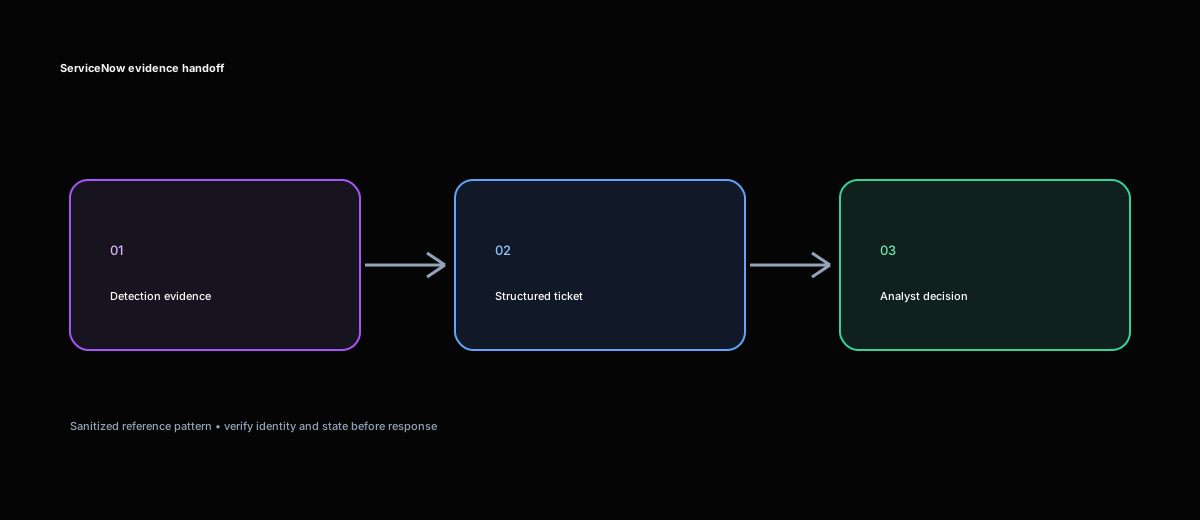
That ticket became the starting point for a shared engineering project. We were not asked to replace the customer’s detection stack or redesign ServiceNow. The requirement was narrower and more demanding: an analyst who had not seen the original alert had to be able to understand the case, follow the evidence, and see the automation outcome from the ticket alone. Repeated workflow runs must not create repeated incidents, and incomplete enrichment must remain visible rather than being converted into reassuring but false completeness.
Turning an operational complaint into a contract
We first walked through the handoff with the people who used it. Detection engineering owned the source incident. The SOC investigated in ServiceNow. IT operations might receive a task later, without access to every security console. Those boundaries mattered more than the mechanics of a POST.
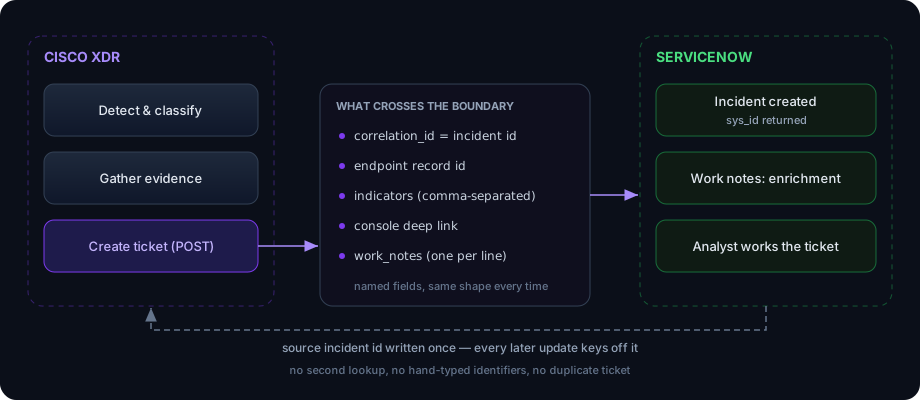
Together we wrote a simple acceptance question: could the next person work the incident without reconstructing the automation run? From that question came a field contract. The ticket needed a stable source incident ID, a concise summary, affected assets, users, indicators, enrichment status, action status, and a source link. ServiceNow’s sys_id and incident number had to be written back to the correlation record immediately after creation.
We also agreed what the integration would not do. It would not infer a configuration item from a hostname. It would not call a failed lookup “unknown” when the distinction between absent data and a failed request mattered. It would not mark an asynchronous response action complete because the provider accepted a request. And it would not copy credentials, authorization headers, or sensitive raw payloads into journal fields.
The first useful artifact was not code. It was this ownership model:
| Information | Owner | Handoff behavior |
|---|---|---|
| Source incident ID and original evidence | XDR/SOAR | Immutable identity and evidence snapshot |
ServiceNow sys_id and number | ServiceNow | Persist after create and reuse for updates |
| Assignment group and operational routing | ServiceNow | Never overwritten by routine source updates |
| Enrichment and action results | Automation/provider | Appended with explicit state and timestamp |
| Approval state | ServiceNow or change process | Returned as a small authenticated decision |
| Overall case state | Shared state machine | Changed only through agreed transitions |
This prevented a future bi-directional loop in which one system translated a status, the other translated it back, and both kept reacting. It also made clear that description, work_notes, and comments were not interchangeable. The description would hold the durable initial evidence snapshot. Internal lookup and action updates would go to work notes. Customer-visible comments would only be used when the local ServiceNow configuration and process explicitly expected them.
Investigating where the evidence disappeared
We traced one anonymized incident from the source event through enrichment, payload construction, the ServiceNow response, and the resulting form. The loss did not happen in one place.
The workflow flattened arrays into prose early, so a truncated indicator string looked like a complete list. Missing values all became unknown, erasing whether a user was not supplied, not found, or failed during lookup. The ticket title and timestamp were being treated as a practical deduplication key, even though neither was stable identity. The create response was logged but its sys_id was not persisted reliably, so later steps could not target the original record. Finally, the workflow’s green completion state represented successful execution of its steps, not successful delivery of usable evidence.
We retained separate states for enrichment:
confirmed: returned and validatednot_found: lookup completed without a matchnot_available: the upstream event did not supply the valuefailed: request or parsing failedskipped: policy prevented the lookup or actionpending: a request was accepted but had no final result
That vocabulary let the SOC tell the difference between “there was no user in this event” and “the identity service was unavailable.” It also allowed the workflow to continue when one of several endpoint lookups failed, while reporting an overall result of partial.
The investigation exposed another identity problem. The workflow handled source incident IDs, alert IDs, endpoint IDs, action IDs, run IDs, ServiceNow numbers, and ServiceNow sys_id values as if they were labels for the same thing. We separated them in one correlation record:
{
  "source_incident_id": "<incident-id>",
  "source_run_id": "<workflow-run-id>",
  "service_now_sys_id": "<sys_id>",
  "service_now_number": "INC00xxxxx",
  "action_ids": ["<action-id>"],
  "last_observed_at": "<timestamp>"
}
A hostname remained useful evidence, but it was not a permanent key. Re-enrollment could give the same machine a new endpoint ID; a rename could leave an old display name in inventory. When identities changed, we retained old and new IDs with an explicit relationship instead of silently replacing history.
Designing the handoff together
The team chose one ServiceNow incident per source incident, with subsequent runs updating that record. Campaign grouping was deliberately left to the source investigation rather than guessed from similar titles or shared hosts. If several endpoint tasks were required, ServiceNow could represent them as related fulfillment tasks without collapsing their individual action results.
For the create path, we used the source incident ID as the correlation key and kept the payload deliberately structured. ServiceNow’s standard Table API supports CRUD operations against configured tables, but available fields and business rules vary by instance, so we validated the accepted fields against the customer’s target table rather than assuming a generic schema (Table API reference). The essential request remained straightforward:
POST https://<instance>.service-now.com/api/now/table/incident
Content-Type: application/json
Authorization: Bearer <token>
{
  "short_description": "Suspicious administrative access on HOST-A",
  "impact": "1",
  "urgency": "1",
  "correlation_id": "incident-<id>",
  "description": "Source incident: incident-<id>\n\nAffected assets\n- HOST-A: confirmed; device <device-id>\n\nUsers involved\n- <user>: confirmed\n\nIndicators\n- <indicator>\n\nAutomation result\n- Reporting completed\n\nSource: https://<xdr>/incidents/<id>"
}
The code was not the difficult part. The important decisions were what qualified for creation, which fields could change later, and what happened on a re-fire. We settled on append plus re-evaluate: preserve the first observation, append newly available evidence as a timestamped work note, and re-run eligibility only where policy allowed it. A closed case would not be silently reopened. A genuinely new source incident would receive its own record, even if its title matched an earlier one.
For updates, the integration addressed the record by sys_id and added journal content rather than replacing the original evidence:
PATCH https://<instance>.service-now.com/api/now/table/incident/<sys_id>
Content-Type: application/json
{
  "work_notes": "Containment result for <incident-id>: action accepted; verification pending.",
  "u_source_incident_id": "<incident-id>",
  "u_automation_state": "pending_verification"
}
We verified the actual instance behavior because ServiceNow journal fields have append semantics and their visibility can be affected by ACLs, portals, and business rules. A routine GET should not be assumed to return journal history in the same way it returns an ordinary string field.
Implementing for uncertain outcomes
The most important implementation path began when a request timed out. A timeout after sending a create request does not tell us whether ServiceNow committed the record. Retrying the same POST blindly could create two incidents.
We changed the sequence to generate a stable correlation key, search for a mapping or matching open record, create only when none existed, and persist the returned identifiers immediately. If a create response was lost, the workflow queried by the source incident key before considering another create. If both create and lookup were uncertain, it stopped and raised a reconciliation item instead of guessing.
POST -> timeout
GET/filter by u_source_incident_id=incident-<id>
  found -> persist sys_id and PATCH existing record
  not found -> POST once, then persist sys_id
  query failed -> stop and send reconciliation alert
We kept ticket state separate from response-action state. If endpoint containment succeeded but the ServiceNow update failed, the workflow recorded containment as succeeded and the handoff as incomplete. It did not retry containment to make the ticket step green. Every event carried a source, action ID, and result state so a repeated callback could be recognized and ignored.
Partial enrichment used the same approach. Consider two assets where one resolved and the other lookup failed:
Affected assets
- HOST-A: confirmed; endpoint link available
- HOST-B: lookup failed; device ID <id-b> retained for follow-up

Users involved
- User mapping: not available for HOST-B

Overall enrichment: partial
The valid evidence still reached the analyst. The failed branch remained visible with a next step. No synthetic CI or user was inserted simply to satisfy a required-looking display.
Testing the paths that had failed quietly
Our test sessions followed the record across three places: the workflow run, the ServiceNow incident, and the source case. We started with one valid incident, then ran the same incident twice and confirmed there was one ticket with an appended update. Two incidents with the same title remained separate because their source IDs differed. Multiple hosts and users appeared as individual entries rather than one flattened sentence.
Then we forced the less comfortable paths. One lookup failed while another succeeded; the ticket showed a partial result. An empty user map followed the documented creation policy rather than inventing a user. We simulated a lost create response and verified that lookup preceded retry. We rejected one field in ServiceNow and confirmed the error identified the field without discarding the rest of the evidence. A repeated callback produced no duplicate activity, and a ServiceNow-owned assignment change did not trigger an update loop.
We also tested the race between action and ticket. In one run, the action platform accepted and verified containment while ServiceNow creation failed. The resulting state was explicit:
Source incident: known
Isolation request: accepted
Isolation verification: succeeded
ServiceNow create: failed
Source work note: succeeded
Overall handoff: incomplete; ticket reconciliation required
That was a successful safety test precisely because the workflow did not describe the whole run as failed and repeat the completed action.
What changed after the rebuild
The outcome was not simply that tickets contained more text. They contained less ambiguity. An analyst could identify the source case, endpoint, user, indicators, and action state; follow links to authoritative systems; and see exactly which enrichment had failed. Re-fires updated the existing investigation, while uncertain writes entered reconciliation instead of multiplying records.
The project changed how we evaluate this class of integration. HTTP success is transport evidence, not handoff success. A useful ticket preserves identity, provenance, partial results, and asynchronous state across an organizational boundary. The decisive test is still the one we wrote with the customer at the beginning: can the next person understand what happened and safely continue the investigation without having been on the original call?